
Generic selectors
Exact matches only
Search in title
Search in content
Post Type Selectors

Blueprints are pre-designed templates that incorporate the scientifically-proven Mindmarker Methodology. These expert-curated guides are seamlessly integrated into the Mindmarker Platform, ensuring you create programs that follow best practices and maximize learner engagement.

Steps to enable Blueprints

1. Navigate to Learning Journeys Menu


2. Add New

a. Click on Add New


3. Select Program

a. Select Scheduled Program from the options
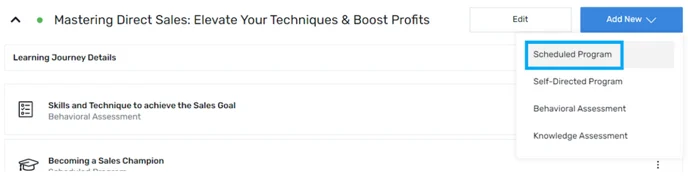
 

4. Use Blueprints

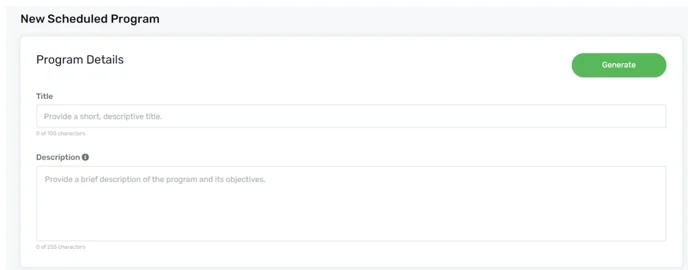
a. Enter all the relevant information, such as Title and Description.
 

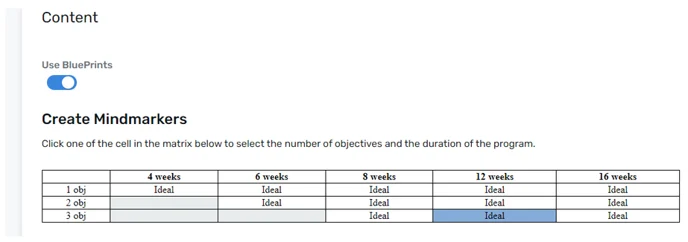
b. TheBlueprint option is available within the content section. Select the objective and program duration matrix.
 

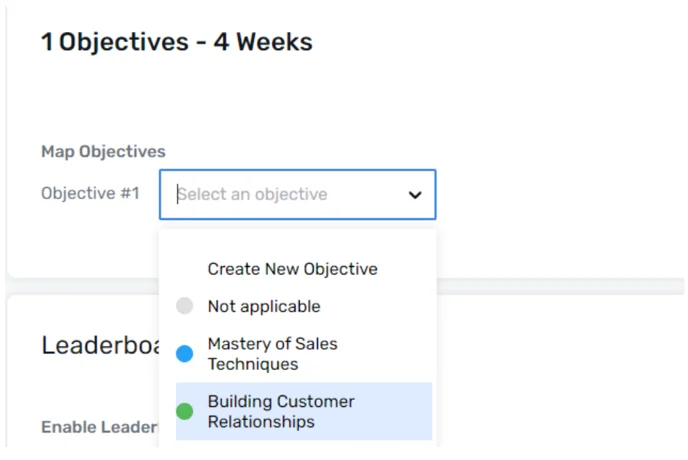
c. After selecting the matrix, select the objectives from the drop-down menu.
 

5. Click Save

a. Click the Save button, once it’s done.

 

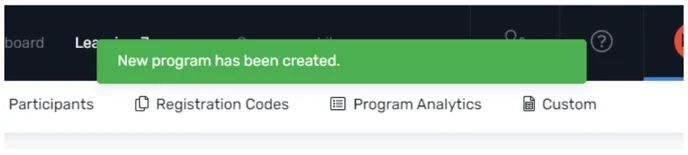
b. A confirmation message will pop up stating that New program has been created.
 

Note: The Blueprints are only available when a new Scheduled program is created.

Let’s Talk Training Transformation

Schedule a Demo or Request a Consultation

*Required fields

Ready to scale your training business?

Book a demo and see the platform in action

Ready to turn your expertise into scalable revenue?

Be the first to know when Ready-to-Sell Training Programs launch. Join our newsletter for early updates, exclusive access, and new program releases.

See Mindmarker in Action

Alex - CEO & Co-Founder

Book a 15-minute demo with our CEO to explore how Mindmarker can transform your training business into a scalable revenue engine.

No pressure. Just a real conversation about your goals and growth opportunities.
