Generic selectors
Exact matches only
Search in title
Search in content
Post Type Selectors

Accessing the underlying data in .xlsx format is easier than ever.

  1. Navigate to your Learning Journeys menu

    1.  Click Learning Journeys from your menu bar.

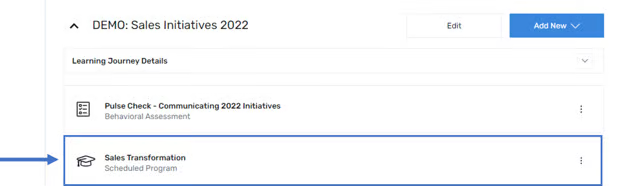
  2. Select the desired Program


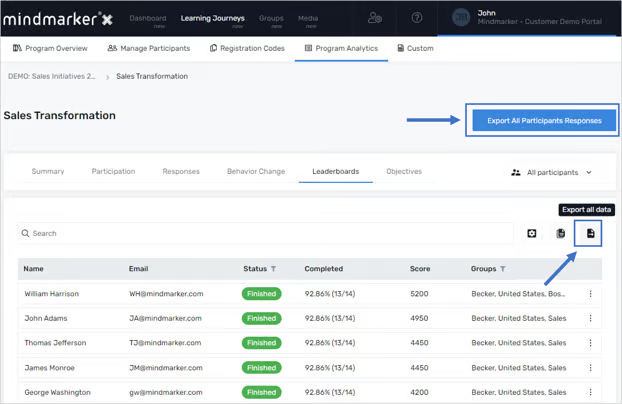
  3. Click Program Analytics at the top of the page


  4. Within Program Analytics, there are 2 options to export your data

    1. To access all program data in one file, select Export All Data in the upper-right corner download responses for all mindmarkers from all participants

    2. Each tab contains a table that can be exported individually by clicking on the export icon as shown below. 

Let’s Talk Training Transformation

Schedule a Demo or Request a Consultation

*Required fields

Ready to scale your training business?

Book a demo and see the platform in action

Ready to turn your expertise into scalable revenue?

Be the first to know when Ready-to-Sell Training Programs launch. Join our newsletter for early updates, exclusive access, and new program releases.

See Mindmarker in Action

Alex - CEO & Co-Founder

Book a 15-minute demo with our CEO to explore how Mindmarker can transform your training business into a scalable revenue engine.

No pressure. Just a real conversation about your goals and growth opportunities.