Skip to content
Enterprise
Trainers & Coaches
Enterprise
Trainers & Coaches
Book an Intro
Login
Generic selectors
Exact matches only
Search in title
Search in content
Post Type Selectors
Steps to delete existing groups.
Navigate to Groups Menu
Click Groups on your menu bar.
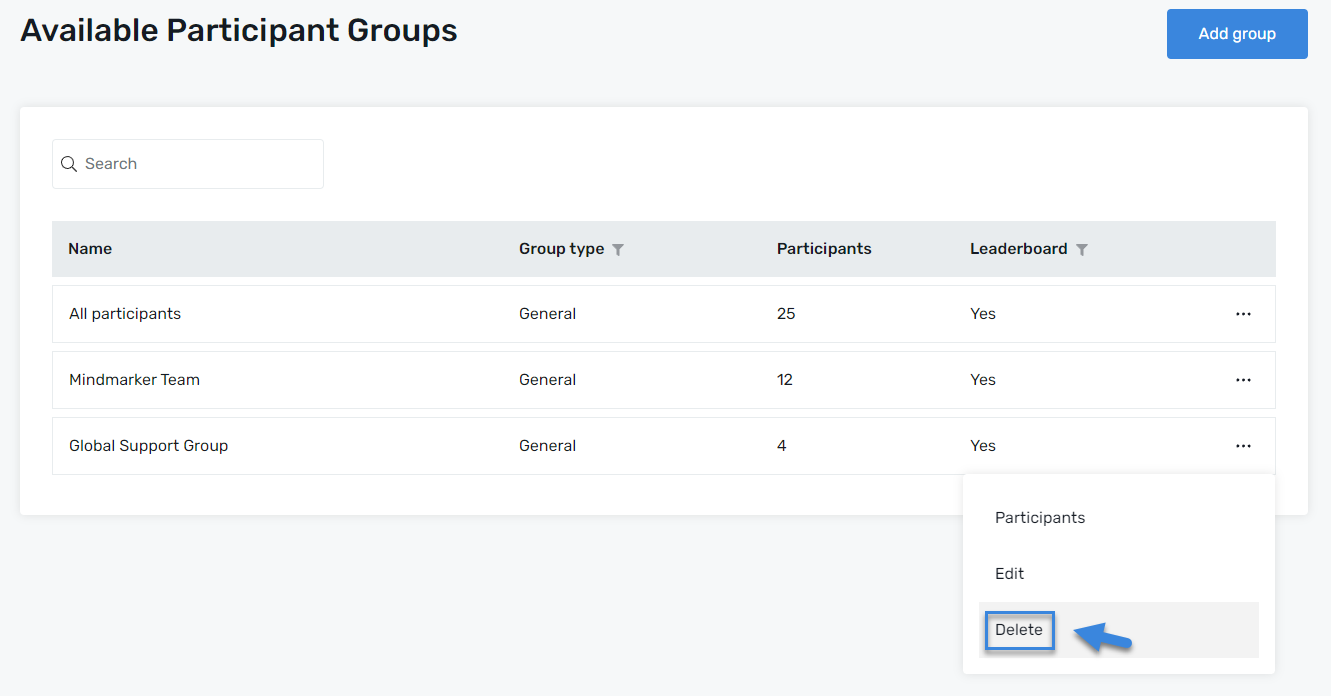
Delete Group
On the
Available Participant Groups
screen, choose the
Group
you want to delete by selecting the
(⋮) menu
, then click
Delete
.
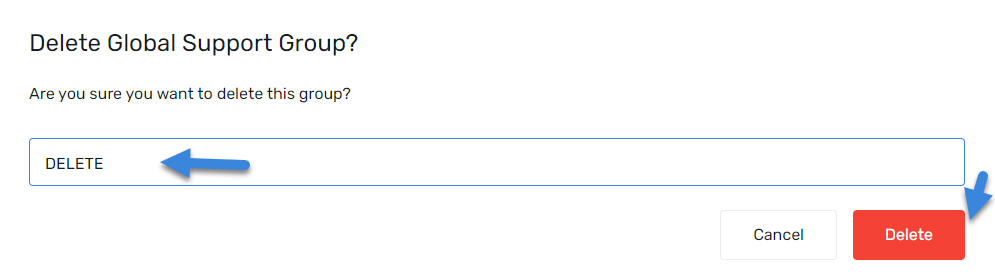
When the
pop-up screen
displays, type the word
DELETE
in the text box and
click Delete
to remove the group.
A
pop-up message
will appear, confirming the deletion of the group.
Let’s Talk Training Transformation
Schedule a Demo or Request a Consultation
First Name
Last Name
Work Email
Phone
Role
*Required fields
I agree to receive communication from Mindmarker
I agree to Mindmarker
Privacy Policy
Request Demo
Enterprise
Trainers & Coaches
Login
Blog
Help
Enterprise
Trainers & Coaches
Login
Blog
Help
Book an Intro
We use cookies to ensure that we give you the best experience on our website. If you continue to use this site we will assume that you are happy with it.
Ok