Generic selectors
Exact matches only
Search in title
Search in content
Post Type Selectors

Steps to enable MM-Assist for Manually created programs with MM-Assist

1. Navigate to Learning Journeys Menu


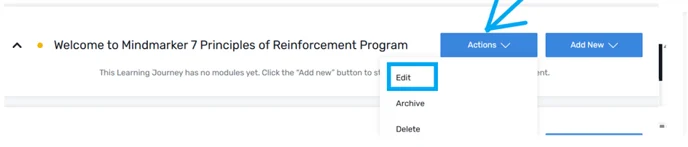
2. Select Edit

a. Navigate to the Action button and select Edit from the  (⋮) menu.
 

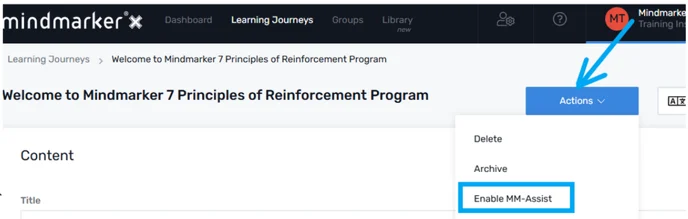
3. Enable MM-Assist

a. Navigate to the Action button and select the Enable MM-Assist button.
 

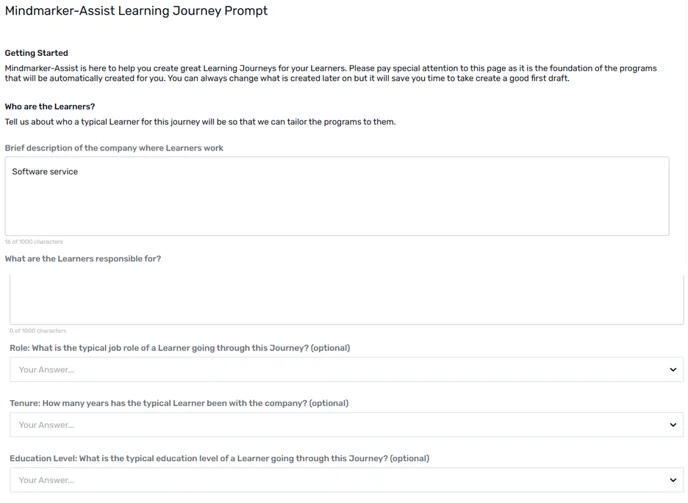
b. Complete the Learning Journey Prompt
 

4. Click Save

a. Click Save And Continue button


b. A confirmation message will pop up confirming Learning Journey has been created.

 

Let’s Talk Training Transformation

Schedule a Demo or Request a Consultation

*Required fields

Ready to scale your training business?

Book a demo and see the platform in action

Ready to turn your expertise into scalable revenue?

Be the first to know when Ready-to-Sell Training Programs launch. Join our newsletter for early updates, exclusive access, and new program releases.

See Mindmarker in Action

Alex - CEO & Co-Founder

Book a 15-minute demo with our CEO to explore how Mindmarker can transform your training business into a scalable revenue engine.

No pressure. Just a real conversation about your goals and growth opportunities.