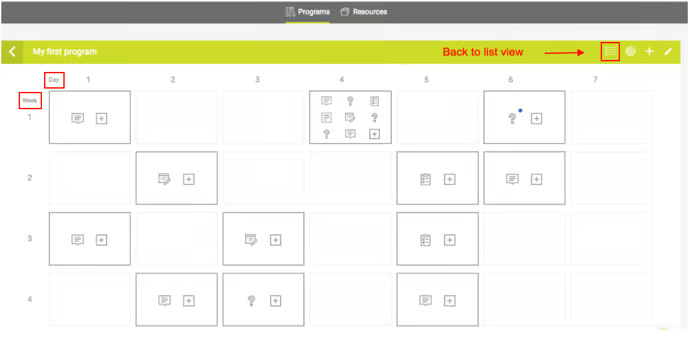
A reinforcement program includes two critical elements: the program design and the program build. The new grid overview provides an excellent visual of the program design, intensity, and overall structure allowing you to see exactly when your mindmarkers are sent and the corresponding objective tied to each message.
As an admin, you can easily switch between the two different views by selecting the corresponding icon in the top right corner of the view (see below).
Interested in adding a new Mindmarker for a particular day? Hover your mouse over the week and day you wish to add to, click the + icon, and a pop-up to add a new mindmarker will show. For the schedule, it’ll automatically take over that day and week value, and all you have to do is select the type of mindmarker and set the time.
You can find the + icon both on days that already have some mindmarkers and on days that are still empty.