Generic selectors
Exact matches only
Search in title
Search in content
Post Type Selectors

Follow these steps to assign a program and group to a coach:

1. Navigate to Learning Journeys Menu

Go to the Learning Journeys menu in your dashboard.

 

2. Select the Learning Journey

Choose the learning journey where you want to assign a coach. Click Manage Facilitators from the (⋮) menu.
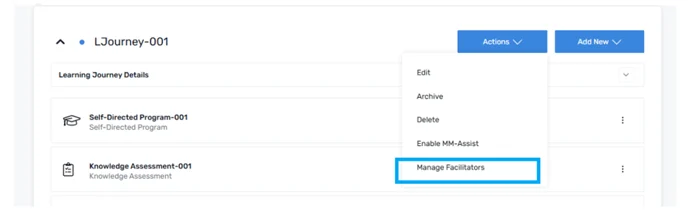
 

3. Assign the Coach

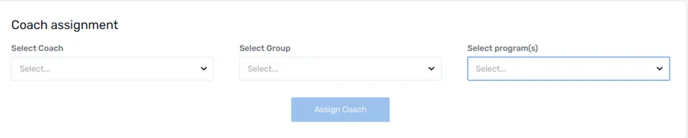
    1. From the drop-down menu, select the Coach you want to assign.
    2. Next, choose the Group you want to assign the coach to.
    3.  Then, select the Program from the drop-down menu. 
 

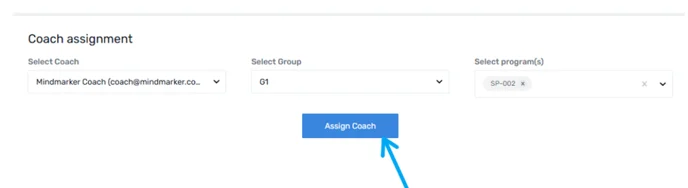
4. Assign the Coach

Click Assign Coach to finalize the assignment. A confirmation message will appear on your screen once the process is complete. 
 

Let’s Talk Training Transformation

Schedule a Demo or Request a Consultation

*Required fields

Ready to scale your training business?

Book a demo and see the platform in action

Ready to turn your expertise into scalable revenue?

Be the first to know when Ready-to-Sell Training Programs launch. Join our newsletter for early updates, exclusive access, and new program releases.

See Mindmarker in Action

Alex - CEO & Co-Founder

Book a 15-minute demo with our CEO to explore how Mindmarker can transform your training business into a scalable revenue engine.

No pressure. Just a real conversation about your goals and growth opportunities.